Let shoppers search your Shopify store with a photo.
Ryzo adds image search, AI text search and smart filters to your store. Shoppers upload or snap a photo, or type what they want in their own words, and see the closest products you sell.
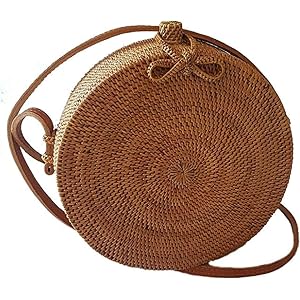
Cropping to the bag…Searching the store…6 closest matches
Similar products
Same product
Round Rattan Bag
$39
Bali Ata Crossbody
$83
Rattan Crossbody
$25.99
Woven Bali Tote
$14
Aurora Rattan Bag
$26
Handwoven Rattan Bag
$15.99
One photo, the six closest products, in the order Ryzo ranked them. Live demo catalogue.Try it
Average rating from 41 reviews
5.0
Searches on every plan
Unlimited
Days in your free trial
14
Languages the app is available in
10
What Ryzo adds to your store
Image search, AI text search and collection filters, plus the reporting to see what shoppers look for. Turn on only the parts you want.
Image search
Shoppers upload a photo or take one with their camera, crop it to the product, and get the closest matches from your catalogue. Handy when they saw something on social media and don't know what it's called.
Upload a photo or use the camera
Crop before searching
Camera icon in your search bar, a floating button, or both
One click from your Shopify admin. No code and no developer.
2
Index your products
Ryzo reads your catalogue, then keeps it in sync as you add or edit products.
3
Switch on what you want in the theme editor
A step-by-step guide opens the theme editor already set up. Choose an image search icon in the header or a floating one, and whether text search replaces your search bar.
Image search · Header icon
Image search · Float icon
Text search · Replace search bar
Text search · Float icon
Try it on your own products first
The Test search page in the Ryzo admin runs on your real catalogue. Nothing changes in your theme until you switch it on.
You pay by the number of products in your catalogue. Every plan has unlimited searches, and paid plans start with a 14-day free trial.
Included on every plan: unlimited queries, visual & image search, advanced filters, real-time sync, analytics. Paid plans add AI search and priority email support.
No. Install Ryzo from the Shopify App Store and follow the step-by-step guide: it opens your theme editor pre-configured, so there is no code to write. If you would rather not do it yourself, the Ryzo team offers hands-on setup support.
Can I try it before it goes live?
Yes. Test search in the Ryzo admin runs on your own products, so you can try settings and compare AI models before anything changes in your theme. Plans start with a 14-day free trial.
How does pricing work?
Plans follow the size of your catalogue. For up to 500 products, monthly pricing is $9 for Basic, $15 for Enhanced, $19 for Premium, with larger tiers on the pricing page. Every plan includes unlimited queries, and yearly billing saves 20%.
Can I match it to my theme?
Yes. Custom CSS and styling cover the results, filters and search entry points. Image search can sit in your header or float on the page, and text search can replace your existing search bar or float — whichever suits your store.
Which languages does it support?
AI text search understands shopper queries in any language. The Ryzo app itself is available in English, Spanish, German, French, Chinese (Simplified), Portuguese, Italian, Korean, Dutch and Arabic.
Does it work on mobile?
Yes. Search, filters and results are fully responsive, and shoppers on a phone can snap a photo with their camera to search by image.
Try Ryzo on your store
Start with a 14-day free trial. Install Ryzo, index your catalogue and run a test search before you switch anything on.